The Main Screen
The Main Screen of Bloat Buster is your central place to view the overall Efficiency of your PC, and also to fix the four types of Software Bloat that slow down your PC.
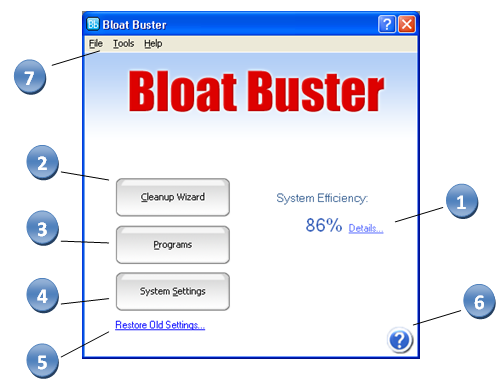
1) System Efficiency Rating: This rating (from 0-100%) gives you an idea of how efficiently your PC is running. The higher it is, the more efficient and clean your PC is. To view the System Efficiency Details, click on the Details link.
2) Cleanup Wizard: This button brings up the Cleanup Wizard, which can fix the four types of bloat that slow down your computer.
3) Programs: This button brings up the Programs dialog box, which lets you view and manage both Startup and Installed programs.
4) System Settings: This button brings up the System Settings dialog box that lets you manage system settings that can speed up your computer.
5) Restore Old Settings: In the unlikely event you wish to restore all system settings and startup programs to their defaults, you can click on this link to do so. It will bring up the Restore Settings dialog box.
6) Help: This button brings up the help system
7) Main Menu: This menu lets you access all the above functionality in a traditional menu.