Resolving Transfer Conflicts
During the Transfer Progress, a conflict may occur. A conflict occurs when there are two files with the same name and location (on each computer), but with different contents or attributes (e.g. file size, or date modified).
If such a file is found during the transfer, Easy Computer Sync asks you what you want to do:
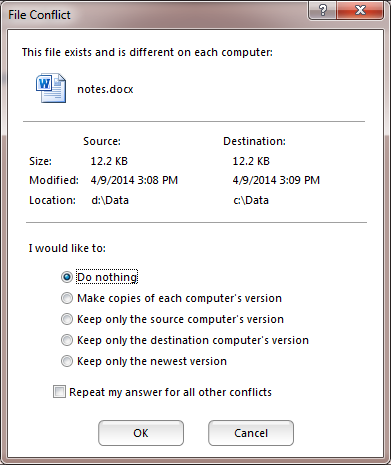
Tip: Hold the mouse cursor over the Locations to see the full paths.
There are 4 options available to you:
1. Do nothing – No action will be taken.
2. Make copies of each computer’s version – Make copies of the conflicting files, so that you don’t lose any data. One version will keep the original name, while the other will be suffixed with “ – Copy X”.
3. Keep only the source computer’s version – Use the version stored on the computer, delete what is stored on the destination computer.
4. Keep only the destination computer’s version – Use the version stored on the destination computer, and leave the source computer’s version as is.
5. Keep only the newest version – Use the version which was most recently modified. The destination computer’s version may be overwritten, but the source computer’s version will not be modified.
If you check the “Repeat my answer for all other conflicts” checkbox, then your chosen option will be repeated the next time there is a conflict.
Note: Whenever a conflict is resolved by deleting a file or folder, it goes into the Recycle Bin of the computer on which it originally existed.