Welcome to Easy Computer Sync™
This software lets you easily synchronize your files and folders between two computers, using an Easy Transfer Cable.

The Easy Transfer Cable is a standard, widely available USB data transfer cable. It was originally created by Microsoft to help people easily move their data to a new Windows Vista or Windows 7 computer. Until now, it was only used for this purpose – to transfer all of your data to a new machine, just one time.
With Easy Computer Sync, you can put it to good use, to synchronize data between two computers at blazing speeds!
Netbook users will find Easy Computer Sync especially useful. For example, if you have a main desktop computer where you keep most of your data, and a “Netbook” or laptop which you typically use for travel, all you have to do is connect the two computers using an Easy Transfer Cable, and synchronize your files and folders quickly and easily! No more complicated network settings, passwords, or firewalls to deal with!
In addition, on many computers, Easy Computer Sync is the fastest way to transfer data, period. For example, it can transfer 10 Gigabytes in about 8 minutes! With Easy Computer Sync, you can easily transfer large collections of music and movies.
What is “Synchronization”?
For our purposes, synchronization is a way to make two folders the same.
As an example, let’s look at the “My Documents” folder on:
Your Main Computer:

Your Laptop Computer:
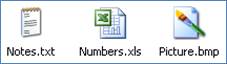
After “synchronizing” your My Documents folders, they would both look like:

The process of synchronization:
· copied the “Sound.wav” file from your Main Computer to your Laptop Computer
· copied the “Picture.bmp” from your Laptop Computer to your Main Computer
In short, it made the data the same in each folder by copying files.
Why is it useful?
Synchronization of folders is useful, since it allows you to always have the most up to date versions of files on both computers. Easy Computer Sync allows you to synchronize:
· My Documents
· My Pictures
· My Music
· My Videos
· Favorites
· Or any other folders you choose!