Registering Bloat Buster
When you first install Bloat Buster, it functions in “Trial Mode”, where only cleanup of Unneeded Files is allowed.
In order to use its full functionality, and see dramatic speed improvements on your PC, you need to register Bloat Buster by purchasing a license.
1) If you already have Bloat Buster running, under the “Help” menu, select “Register…”
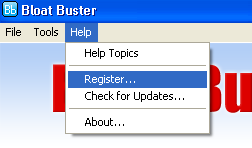
Or, when you start Bloat Buster, you will see a screen like the following:

Make sure that the “Register it” option is selected, and press OK.
2) The registration screen will appear:
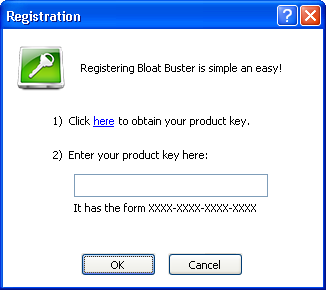
3) Click on the link “here”, which will take you to http://www.bloatbuster.com, where you can purchase a license (all major credit cards and PayPal™ accepted).
4) You will receive a “product key”, which is a code that looks like: XXXX-XXXX-XXXX-XXXX
5) Enter this product key in the box under as shown above, and click OK.
You can now use all of Bloat Buster’s functionality for an unlimited period of time!